|
|
Crystaltrack REQSMGMT (Requests Management: Workflow Engine):
Main Concept: Request to be created and evolved through a Process (workflow).
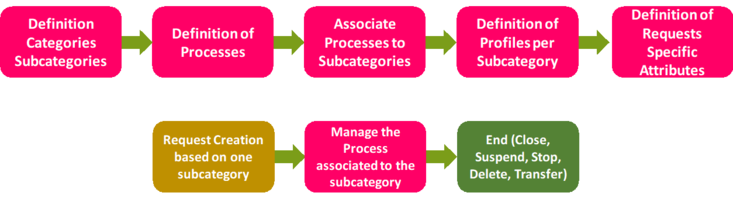
Definition of Categories and Subcategories of Requests.
Definition of Profiles Participating to Processes (workflows).
Definition of Statuses of Processes Tasks.
Definition of User-Defined Attributes to be added to the Requests and/or Tasks.
Definition, for each Subcategory, the associated Process, and associated Profiles.
A Request can be Created, Deleted, Suspended, Stopped, or Archived.
When a Request is Created => The Participants will receive their tasks to be claimed.
A task can be Claimed, Started, Released, Completed, and Undo.
Each Request has its current Status, Holders, and Task.
The Process is Ended when the final task is completed.
The Ended Request can be Archived.
Several reports are already proposed.
Advanced Reporting can be done for any needed statistics.
|
The Request is a tool indicating a specific need expressed by an internal or external client. Each Request will be a trigger for one or more processes in the organization.
The processing of a Request allows the assignment of a “Request Responsible” who is accountable to plan and monitor tasks in order to solve the issue expressed through the Request.
A Request should have at least the following attributes:
Type (Category, Sub-category, Process and User Define Attributes).
Importance to manage priorities (urgent, High, medium, Low).
Unique Identifier.
Stakeholders (Requester, Request Owner, Request Responsible).
Life cycle dates (creation, opening, execution, monitoring, closing).
Requests Life Cycle:
User-Defined Tasks to be Used by Processes (Workflows)
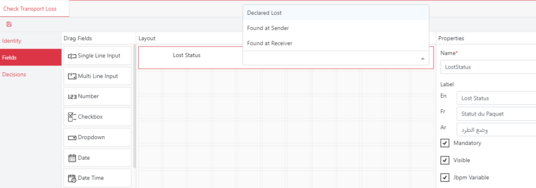
User-Defined Tasks Editor: Fields and Decision Table
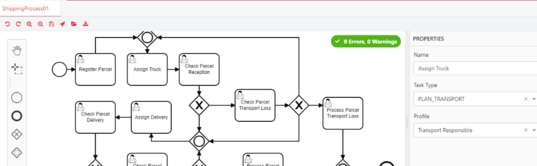
Workflow Editor
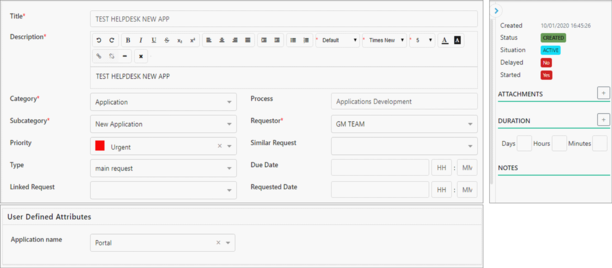
Request Sheet (Situation, Status, Fields, User-Defined Attributes, Attachments, Notes)
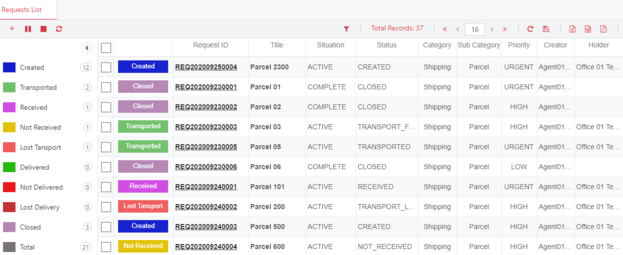
My Requests Table with Categorization and Contextual Actions
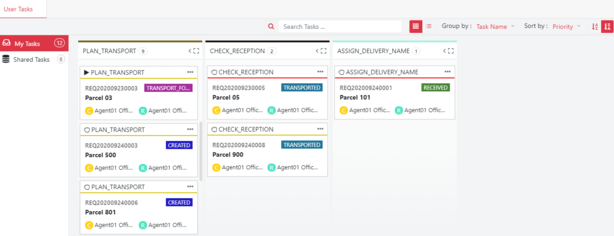
My Tasks (Release, Start, Complete, Undo) and Shared Tasks (Claim)


 contact@evolusys.com