ATTMGMT Validate Attendance
Attendance => Attendance View:
This section presents all attendance data detailed and ready to be validated.
Based on the given permission the records can be modified same as entered data or rejected to be fixed and resubmitted.
The validation view data modification allowed :
If the user has the permission to modify the data, all actions in the entered screen will have the same behavior. The user can update, delete, or add in and out for attendance. He can also change the absence type and then click on the validate button to validate the attendance.
The validation view data modification not allowed: in this case the user must click on the reject button to reject any record that not correct or has problem including absence type:
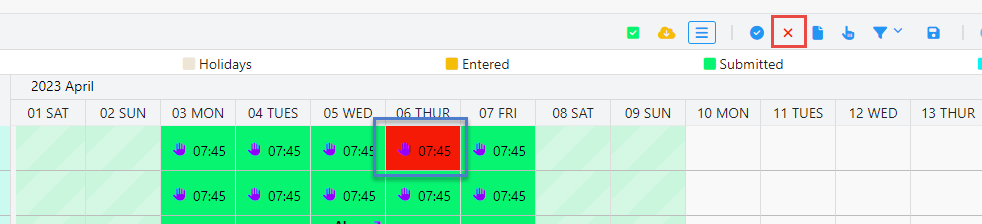
Once the data rejected a new view will display under the name (rejected data) as following:
The button (X) represents the rejected data view and the color red represent the rejected record.
The user has to go the entered view screen in order to fix the rejected data and resubmitted it as following:
Click on the left top button (switch to entered) the rejected record will be available in the entered screens.
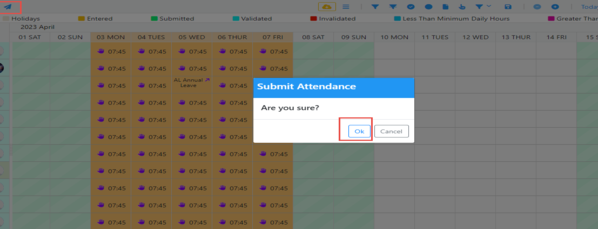
Do all the necessary action to fix the data and then click the submit button same behavior as submit data:
When all the data are resubmitted now all the data are correct and ready to be validated.
Click on Validate button: Attendance is validated and saved.
Validation process:
Once the validated button is clicked the following points will be done
Month validation: validate the actual , shortage and RAL hours are calculated
Validation done for all the days of the month : the all days validated flag is turned true in order to validate the data in next month
Fix shortage : (settings) checked the system will make sure that if any shortage available the shortage value will be deducted from RAL balance and added to the field correction to fix the actual hours to be invoiced , if the RAL balance is ZERO the shortage will stay as is.
Invoiced hours : the system will check if the actual hours less than the mandatory hours the total invoiced hours will be (mandatory-actual hours) else the invoiced hours =(mandatory hours).
Unpaid leave : if any team members has an unpaid leave during the month will (the value of absence daily hours) will be deducted from the actual hours.
Hanover hours : if any of the team members has started work during the validated month the handover hours will be calculated based on the configuration in the settings.


 contact@evolusys.com