Calendar Days
Consists of 2 fields: Weekends and Holidays.
Click on edit to change the colors and font. The shading is the background of the cell, where the font is the text color.
Choose from the Bold, Italic, and Underline options if needed then click on Save.
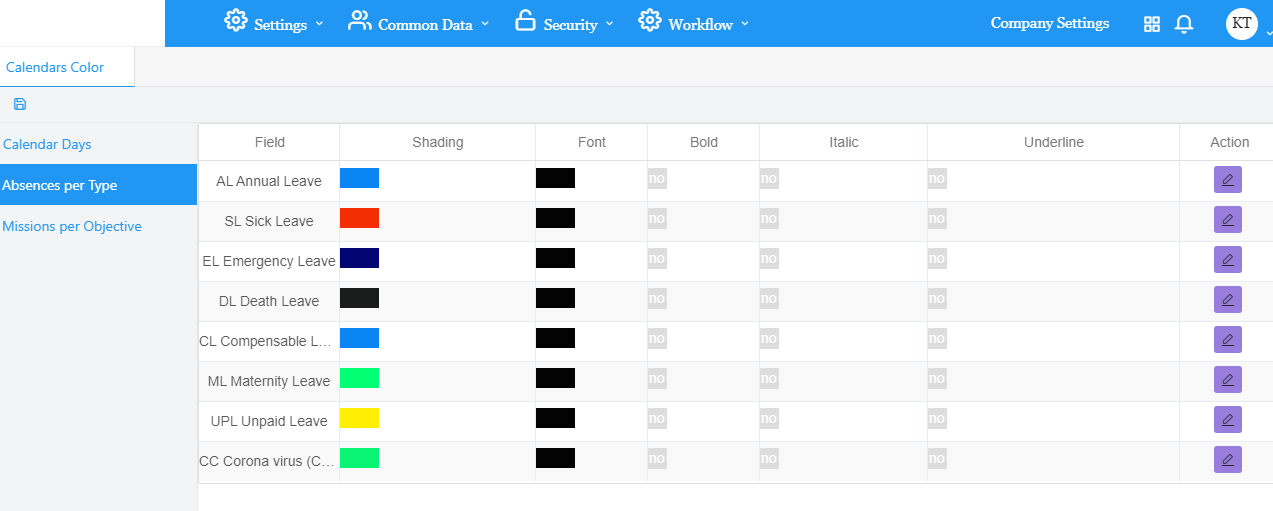
Absences per Type
Consists of all the leave types available in the company.
Click on edit to change the colors and font. The shading is the background of the cell, where the font is the text color.
Choose from the Bold, Italic, and Underline options if needed then click on Save.
Missions per objective
Consists of all mission types available in the company.
Click on edit to change the colors and font. The shading is the background of the cell, where the font is the text color.
Choose from the Bold, Italic, and Underline options if needed then click on Save.
Save
After finishing all editing, click on the Save button at the top left corner to save all changes of the tab.


 contact@evolusys.com